 Sottiq
An AI assistant for your job interviews
Sottiq knows the role and your background before the first question. During the video interview, it suggests short answer ideas based on your own experience.
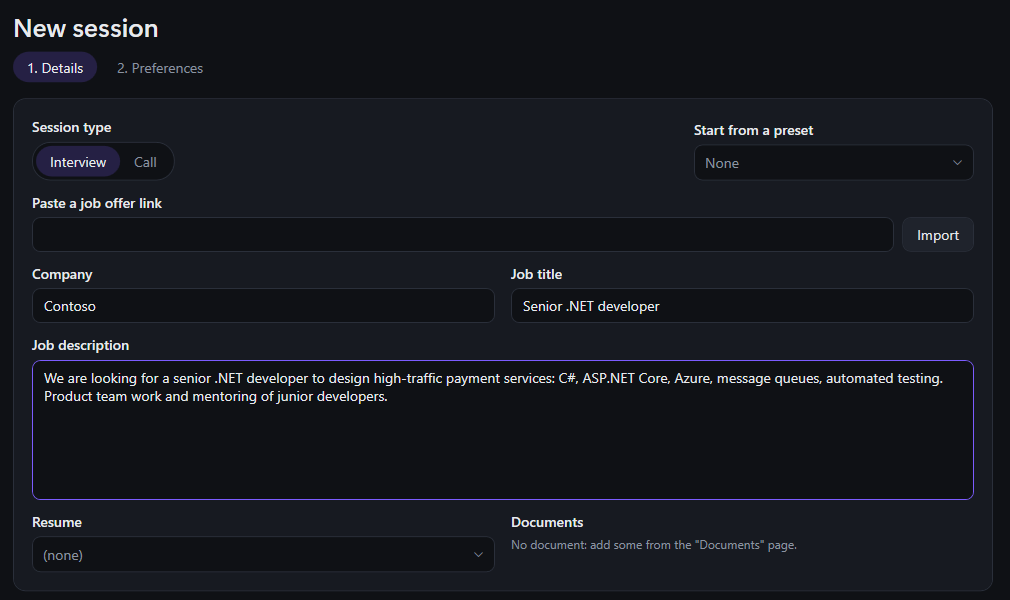
Come prepared: your resume and the job posting
Paste the link to the job posting and add your resume: Sottiq picks out the role, the company, the skills expected and your background. Add other prep documents (notes on the company, projects to highlight) and save presets for your next applications.
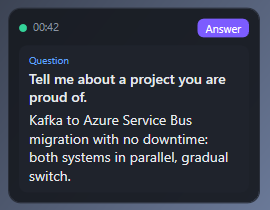
During the interview: the right idea at the right time
Sottiq transcribes the call live and spots the questions you are asked. Within 2 to 3 seconds, a short answer appears in a small window above the video call: a few key points, with your experience and the words of the posting. Only you see it, and no bot joins the interview.
Technical interviews: code mode
For a developer interview, press Ctrl+Shift+S: Sottiq captures the exercise on screen, and the AI explains the approach, the complexity and a commented solution in your language (C#, Python, Java, JavaScript, SQL…). More on code mode
After the interview: a written debrief
As soon as the call ends, you get notes: the questions asked, what you answered, the next steps the recruiter mentioned. Perfect to prepare the second round.
Use it responsibly
Sottiq is a memory aid: the ideas come from your real background, and you answer in your own words. Follow the rules set by the recruiter and tell the other side you are transcribing the call where the law requires it. See the terms of use.
Your interview with Sottiq
- Create an "Interview" session with the job posting link and your resume.
- Start the Teams, Zoom or Meet interview as usual.
- Read the answer ideas during the call, then the debrief at the end.
Frequently asked questions
Can the recruiter see Sottiq?
No bot joins the call: Sottiq listens to your PC's audio and shows the ideas in a window only you see.
Does it work for interviews in French?
Yes. Sottiq transcribes English and French, even mixed in the same call.
Is it suited to technical interviews?
Yes: code mode reads the exercise on screen and explains a commented solution in the language of your choice.
How much does it cost?
30 minutes of calls free when you sign up, no credit card, then €20 a month with no commitment, AI included.
Try Sottiq on your next call
30 minutes of calls free, no credit card. Then €20 a month, cancel anytime.
Download Sottiq for Windows